Make more music.2 months free on annual plansExplore plans
Add Vocals to Instrumental
Add AI vocals to an instrumental you own: upload the beat, paste your lyrics, describe the voice, and get a song sung over your music.
New
How to add vocals to an instrumental with AI
1
Upload your beat
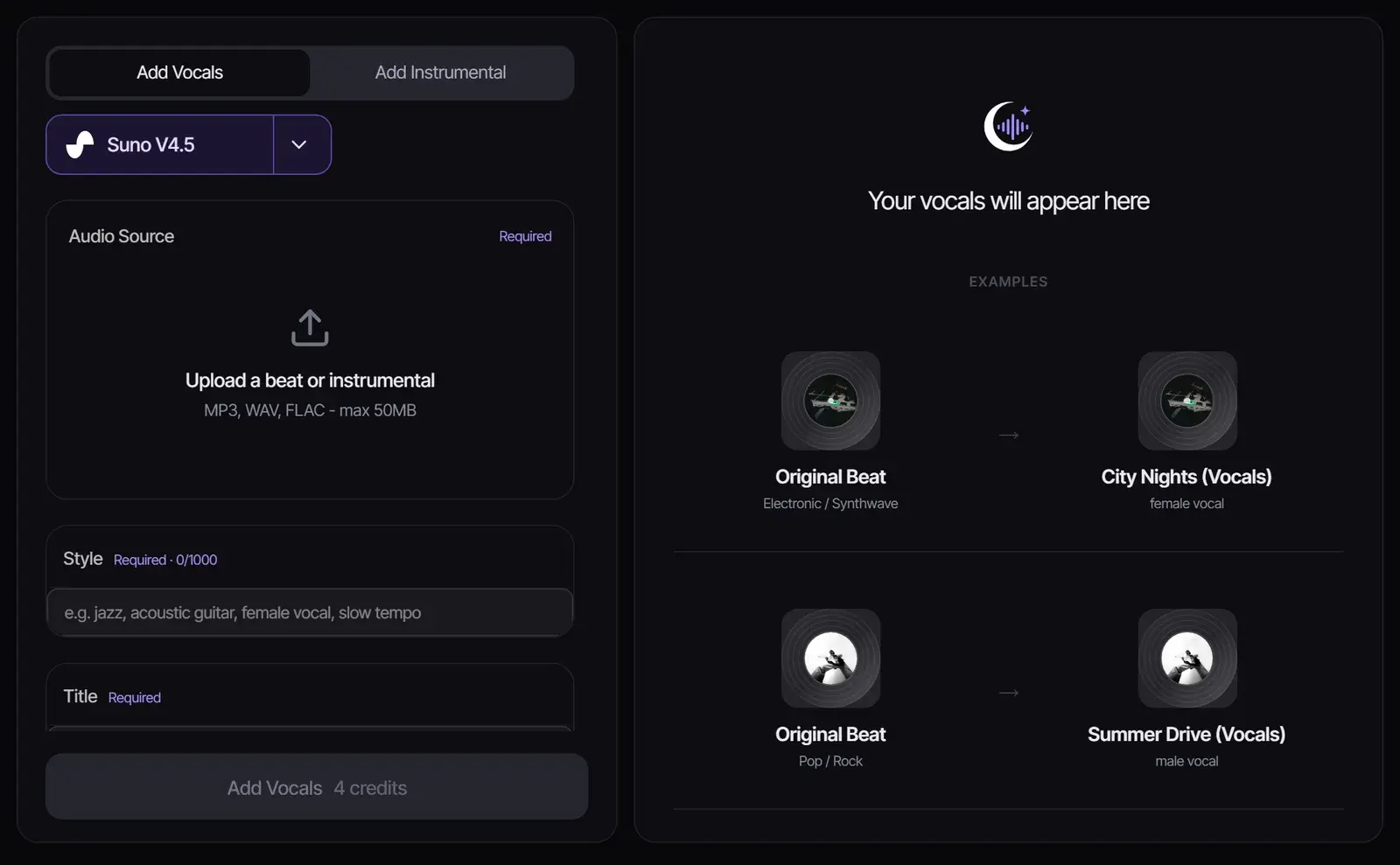
Drop in the instrumental as an MP3, WAV or FLAC file up to 50 MB, or pick one from your Songluna AI library.
2
Add the style, title and lyrics
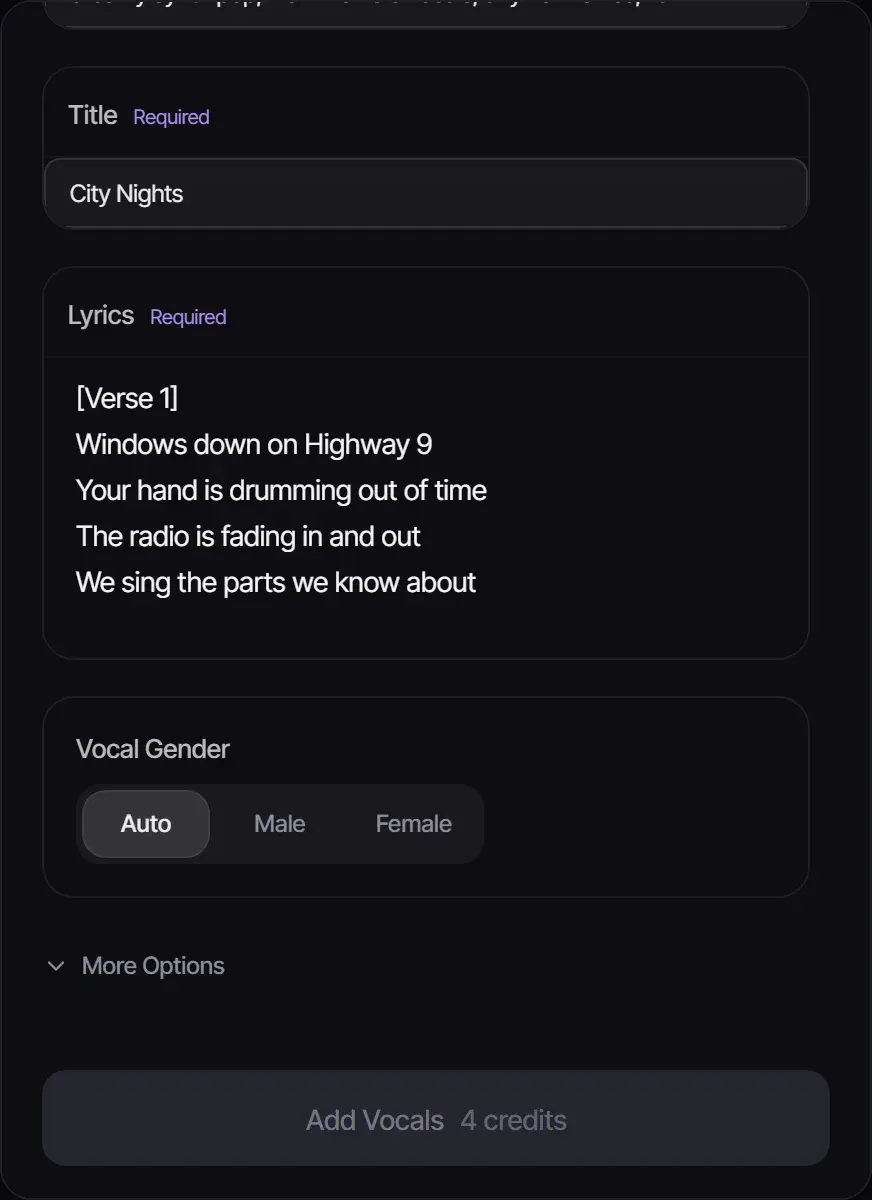
Describe the vocal and the feel in Style, give the song a title, and paste your lyrics with section tags such as [Verse] and [Chorus]. Choose a male or female voice, or leave it on Auto.
3
Add the vocals and listen
Select Add Vocals. Suno V4.5 sings your lyrics over the instrumental for 4 credits, and the finished song appears in your results.
What you get
The model writes a vocal melody for your lyrics that fits the tempo, key and sections of your instrumental, sings it in the voice you described, and returns the finished song with vocals, taking your track from instrumental to song in one step. Your original upload is kept unchanged.
Setting
What to enter
Style
The vocal and the feel, up to 1,000 characters: "warm female vocals, airy harmonies, dreamy synth pop, 104 BPM"
Title
The song title
Lyrics
Your words, with a section tag before each part
Vocal gender
Auto, male or female
Tips for vocals that fit the beat
Match the style to the beat: genre, mood and tempo should describe the instrumental you uploaded.
Keep lyric lines short enough to fit the bars of your beat; long lines get rushed.
Tag every section so the vocal knows where the chorus starts.
No lyrics yet? Draft them with the AI Lyrics Generator first. No beat either? Lyrics to Song writes the music and the vocals from your lyrics.
Want to mix the result yourself? Separate the vocal afterwards with the Stem Splitter.
Already recorded your vocals? Put them on the instrumental
If you sang the vocal yourself, you do not need AI vocals: layer your recording over the beat in Songluna AI Studio, free and without an account.
Open Studio and drop in the instrumental, then your vocal recording. Each file becomes its own track.
Drag the vocal clip so it starts on the beat, and set each track’s volume so the voice sits on top of the music.
Export the mix as WAV, MP3 or FLAC. Sign in only if you want to save the project or record straight into Studio.
For a cleaner blend, record without reverb at the tempo of the beat, leave some headroom so the vocal never clips, and turn the instrumental down a little where the voice comes in. Need the key of the beat to sing in tune? Find it with the Key & BPM Finder.
Have vocals and need the music instead?
The same workspace has an Add Instrumental tab that does the opposite: upload an a cappella or a vocal recording and AI builds the backing track around it.
Use beats and lyrics you have the rights to
Upload instrumentals you made, bought with a license that allows this use, or have permission to use, and write or license your own lyrics. Songs you generate follow your plan: personal use on Free, commercial use for eligible music on Plus and Pro. See Commercial Use.
What you can create when you add vocals to a beat
Turn Beats into Complete Songs
Have a fire instrumental but no vocalist? Upload your beat and get AI-generated vocals that match the energy, key, and vibe of your production.
Test Vocal Ideas on Your Productions
Quickly hear how different vocal styles sound over your beat before committing to a session singer. Generate multiple vocal takes with different styles and choose the best fit.
Create Demo Tracks for Artists
Producers can create complete demos with reference vocals to pitch to artists. Show exactly how the final song could sound with vocals over the beat.
Vocal build examples
Add a topline direction to an existing beat
Use the workflow when the instrumental already has energy, but the project still needs a hook, chant, guide vocal, or branded line.
TikTok editor
Use case example
Hook idea to original sound
TikTok
Ask for a punchy opening and a timed drop, keep the best version, and cut the video around it rather than reusing a stock loop.
Edit timing
An intro hit, a mid-video drop and an ending to time the edit around.
Shopify ads editor
Use case example
Product brief to jingle
Shopify
Turn a product page or a short brief into a 15-second jingle while the ad edit is still in progress.
Ad audio
A brand hook with a call-to-action ending; paid plans include commercial use for eligible music.
Podcast host
Use case example
Show concept to intro music
Podcast
Describe the tone of the show in plain English and get an intro that sounds like the show rather than a template, ready to reuse every episode.
Audio identity
Intro, outro and segment bumper options in the same style.
Frequently asked questions
Can AI add vocals to my instrumental?
Yes. Upload the instrumental, paste your lyrics and describe the vocal, and AI sings your lyrics over the beat.
Is it free to add vocals to an instrumental?
New accounts get 8 free credits without a credit card, and adding vocals costs 4 credits, so you can try it twice for free.
Can I choose a male or female voice?
Yes. Set Vocal Gender to male or female, or leave it on Auto, and describe the voice further in Style.
Which files can I upload?
MP3, WAV or FLAC instrumentals up to 50 MB, or any track in your Songluna AI library.
Do I need my own lyrics?
Yes, lyrics are required. Write your own or draft them with the AI Lyrics Generator, then edit them before you add vocals.
How do I put my own recorded vocals on an instrumental?
Open Studio, drop in the instrumental and your vocal file, line the vocal up with the beat, balance the volumes and export the mix. No AI or account is needed for that.
Can I add an instrumental to vocals instead?
Yes. Use the Add Instrumental tab in the same workspace to build backing music around a vocal recording.
Updated October 25, 2026 · Written and reviewed by the Songluna AI team