
How to Make AI Music: A Step-by-Step Guide (2026)
Learn how to make AI music from a text prompt or your own lyrics: write a prompt, pick a model, generate, edit, and check the rights before you publish.
You can make a complete song with AI in a few minutes, with no instruments and no music theory. You describe the music in words or paste your lyrics, a music model composes and performs it, and you keep the version you like.
This AI music tutorial shows how to make a song with AI from start to finish with the Songluna AI song generator, using real screenshots from the workspace. The same steps apply to most AI music tools. They also show how to make music with AI when you only need an instrumental, and how to create AI music for a video, a game or a podcast.
Ready to try the steps? Open the AI song maker, describe the music you want, choose a model and review the displayed credit cost. If you already wrote the words, Lyrics to Song opens the workflow for your own lyrics. Keep this guide alongside the workspace as you work through the examples.
How to make AI music: the short version
- Decide what the music is for: a full song, a jingle, background music or a beat.
- Write a prompt with genre, mood, instruments, vocals and tempo.
- Add your own lyrics, or switch to instrumental.
- Choose a model; each shows its credit cost before you generate.
- Generate two or three versions and keep the best one.
- Finish it: extend, remix or split the song into stems.
- Check your plan and the platform's rules before you publish.
Step 1: Decide what the music is for
The purpose decides almost everything else. A YouTube intro needs 10 to 20 seconds of energetic instrumental music. A wedding song needs vocals and lyrics. A study playlist needs long, calm instrumentals that stay in the background.
Write down three things before you start: how long it should be, whether it needs vocals, and where it will be played. That gives you most of your prompt.
Some jobs have their own tool: the AI Jingle Generator makes short brand stings and podcast intros, and the AI Sound Effect Generator makes whooshes, hits and ambience rather than music.
Step 2: Write a prompt a music model understands
Music models respond best to concrete musical words. A reliable formula is genre + mood + instruments + vocals + tempo:
- Genre: lo-fi hip hop, indie pop, cinematic orchestral, trap
- Mood: relaxed, euphoric, melancholic, tense
- Instruments: Rhodes piano, jangly guitars, 808s, string section
- Vocals: warm female vocals, raspy male vocals, choir, or no vocals
- Tempo: a BPM number, such as 80 for slow or 128 for dance
"Upbeat indie pop song about a summer road trip, bright jangly guitars, warm female vocals, big singalong chorus, 120 BPM" will give you a far more predictable result than "a happy summer song". Describe the sound instead of naming an artist: many models block prompts that name real artists, and imitating one raises rights questions.
To get there faster, the free Suno Prompt Generator turns a song idea into style tags, Music to Prompt describes a reference track you upload, and the Suno prompts guide has tested examples by genre.
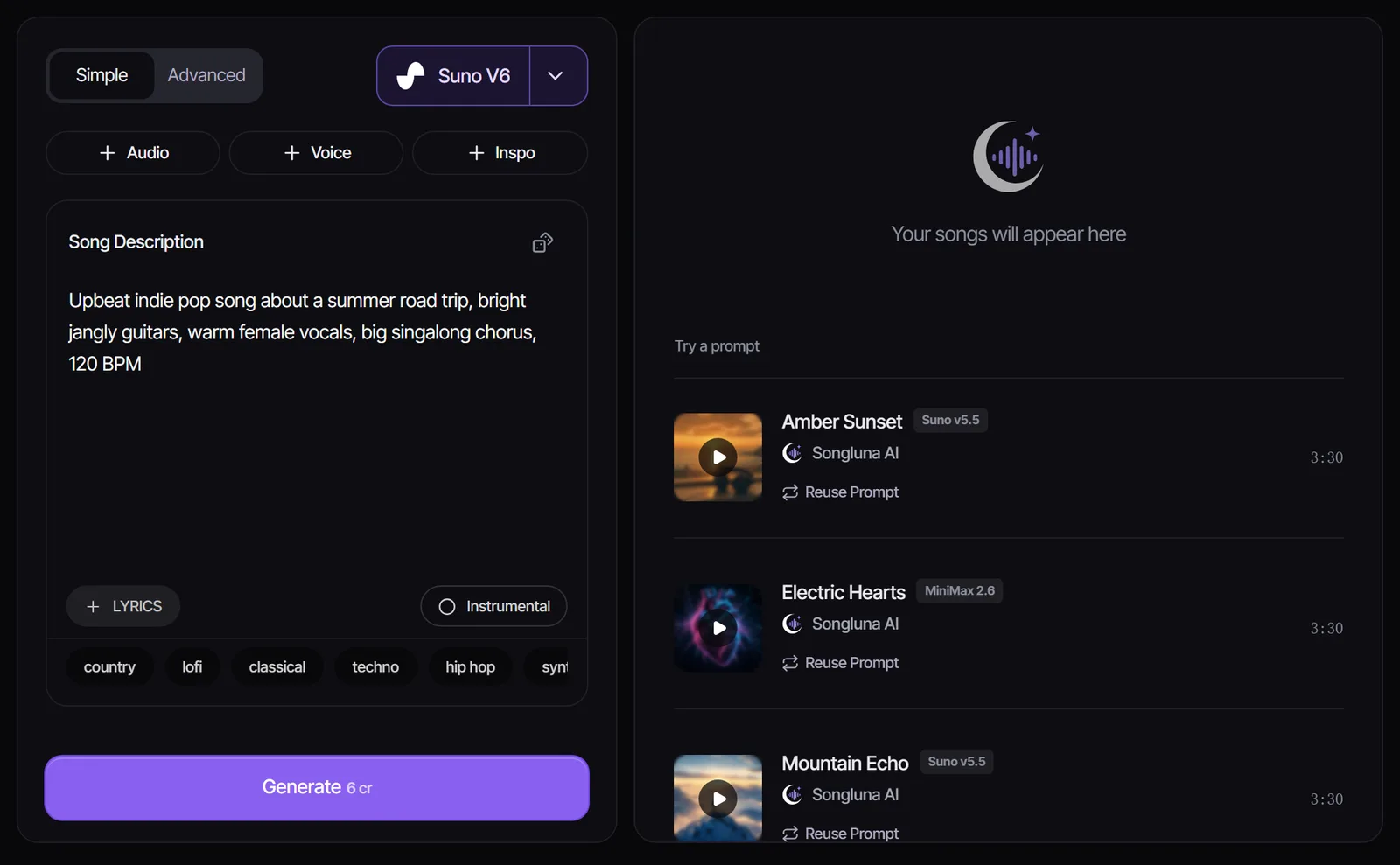
Step 3: Add lyrics, or go instrumental
If you want vocals, you have three options: write the lyrics yourself, let the model write them, or ask for a first draft with "Help me write lyrics" and edit it. The free AI Lyrics Generator also drafts editable lyrics from a topic, mood and structure.
When you write your own, put a section tag on its own line before each part: [Verse], [Pre-Chorus], [Chorus], [Bridge], [Outro]. Repeat the chorus with the same words each time. Tags are the simplest way to control the structure of the song. Lyrics to Song covers lyric formatting in more detail.
For background music, beats and intros, turn on Instrumental instead. Already have a beat? Add vocals to the instrumental and AI sings your lyrics over it.
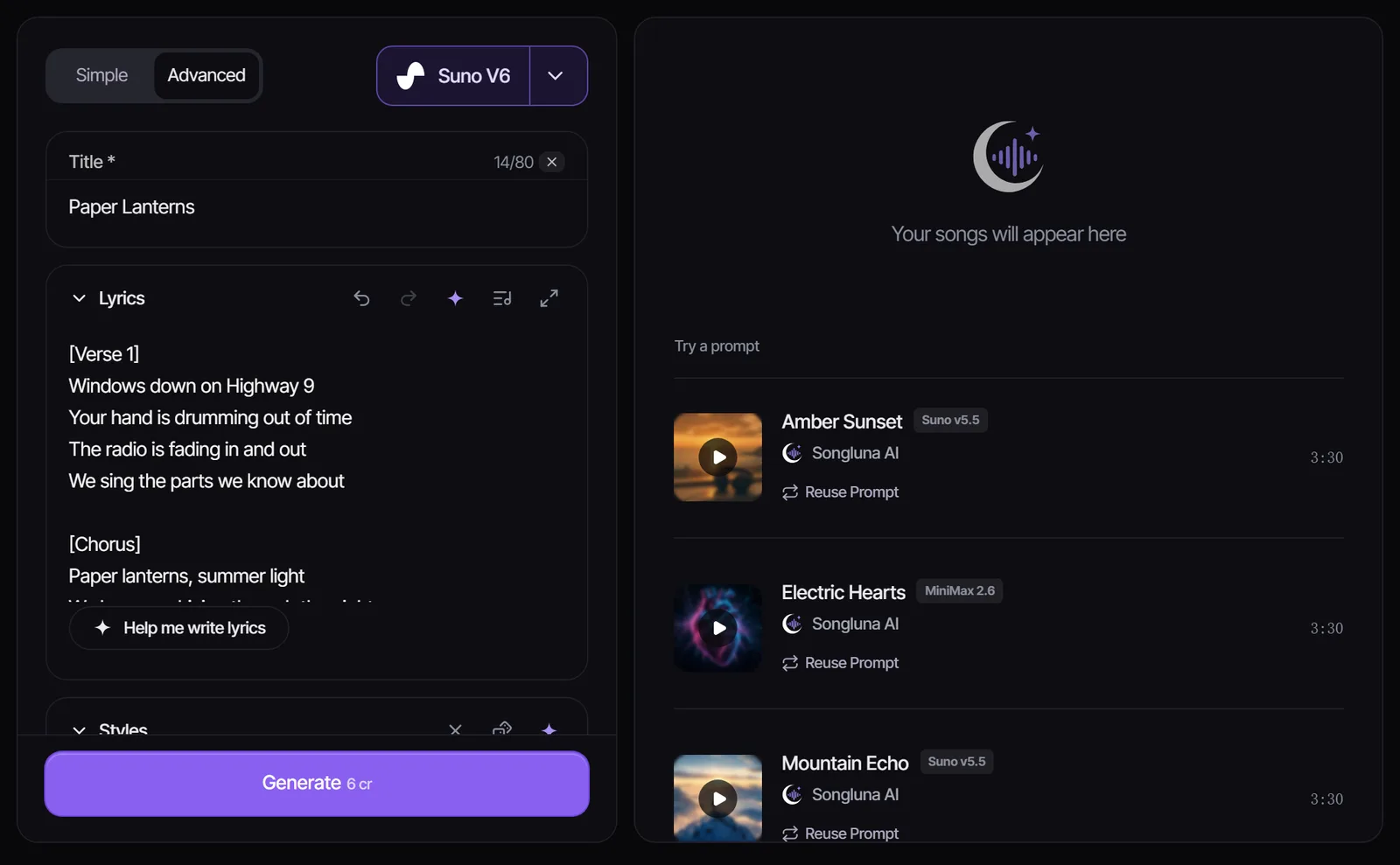
Step 4: Choose a model
Different models have different strengths and costs. In Songluna AI every model is available on every plan, and the menu shows the credit cost of each one before you generate. Suno V6 is the default for polished songs with vocals (the Suno V6 guide covers what is new in it); ACE Step 1.5 costs 1 credit and is a cheap way to try ideas.
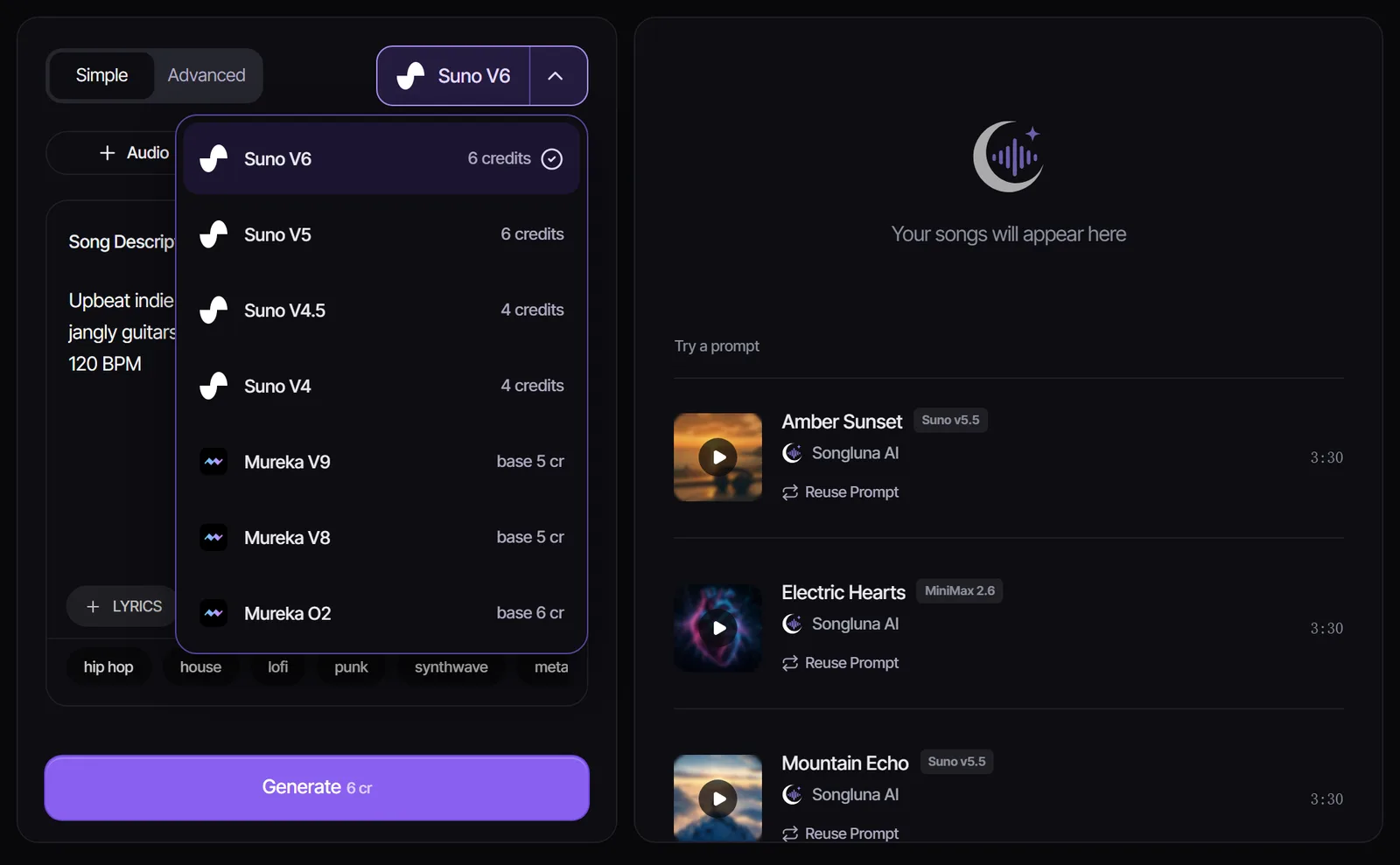
The AI song generator home page lists all current models, their costs and their length limits.
Step 5: Generate, compare and refine
Generate more than once. The same prompt gives a different song each time, so make two or three versions and keep the best.
If none is right, change one thing at a time: the tempo, an instrument, or the vocal description. Changing everything at once makes it hard to learn what the model responds to. When the melody is right but the words are not, edit the lyrics and generate again.
Step 6: Finish the track
A generated song is often a starting point. Common next steps:
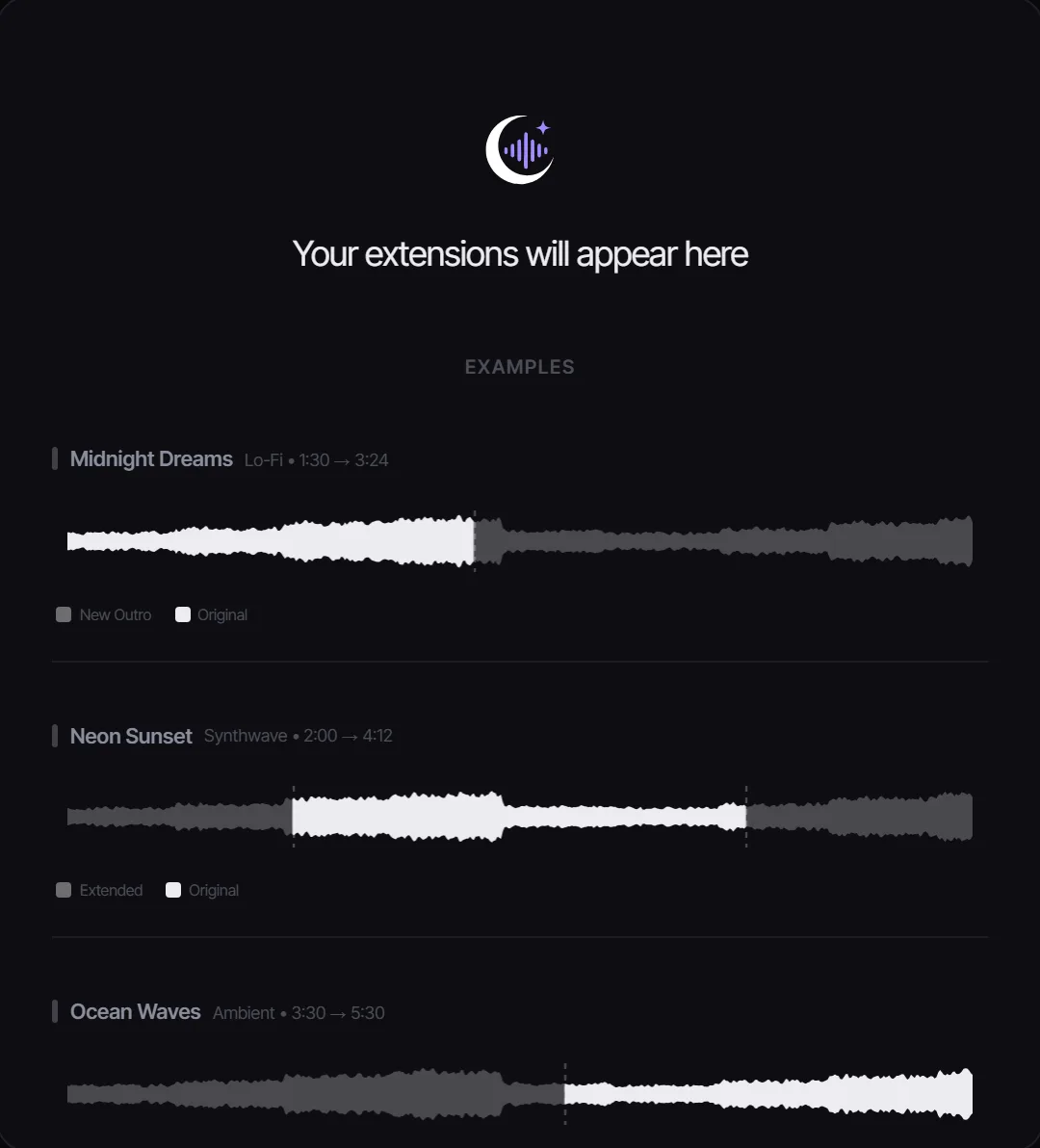
- Make it longer: add a new intro or outro with the AI Music Extender.
- Change the style: remake the song in another genre with the AI Song Remixer.
- Separate the parts: split vocals, drums, bass and the rest with the Stem Splitter to mix them yourself.
- Make a karaoke version: take the vocals out with the Vocal Remover.
- Get the notes: turn the melody or a stem into MIDI with MP3 to MIDI.
Is it legal to make AI music?
Making music with AI is legal. The legal questions are about what you put in and what you do with the result.
- Inputs: only upload audio or lyrics you created or have permission to use, and do not try to imitate a specific artist's voice.
- Copyright in the output: in January 2025 the U.S. Copyright Office concluded that AI-generated material is protected by copyright only where a human author determined sufficient expressive elements. Prompts alone are not enough, but lyrics you wrote, or your own creative arrangement and edits, can be protected (Copyright and Artificial Intelligence, Part 2).
- Courts agree: the D.C. Circuit held in Thaler v. Perlmutter that a machine cannot be the author of a copyrighted work (opinion, March 2025), and the Supreme Court declined to review that decision on March 2, 2026 (docket 25-449).
The AI music copyright guide covers ownership, registration and infringement in more detail. This is general information, not legal advice. For a specific release, check with a qualified lawyer.
Can AI music make money?
Yes, if you have the rights to use it commercially and you follow each platform's rules.
- Your plan: on Songluna AI, paid plans include commercial-use rights for eligible music; the Free plan is for personal use. Commercial Use explains what each plan covers.
- Platform rules: YouTube requires creators to disclose realistic AI-generated content, including AI music that is the main focus of a video. Streaming distributors also have their own AI policies, so read them before you upload.
- Ownership: because purely AI-generated audio may not be protected by copyright, adding your own lyrics, arrangement or performance makes your work stronger and easier to defend.
Common mistakes to avoid
- Writing vague prompts with mood words only and no genre, instruments or tempo.
- Pasting lyrics without section tags, then wondering why there is no chorus.
- Judging a prompt by a single generation instead of comparing a few.
- Uploading songs or lyrics you do not have rights to.
- Publishing on a free plan when the project is commercial.
Frequently asked questions
Can I make my own AI music?
Yes. All you need is an idea and a browser. Describe the song or paste your lyrics, choose a model and generate. New Songluna AI accounts get 8 free credits without a credit card.
Can I create music using AI for free?
You can start free. The 8 free credits cover one Suno V6 song or up to eight ACE Step 1.5 songs. Free-plan music is for personal use; commercial projects need a paid plan.
Can ChatGPT make music?
Chatbots can help you write lyrics and describe a sound, but they do not produce finished songs on their own. Paste the lyrics into Lyrics to Song or the description into the AI song generator to turn the text into audio.
How long does it take to make an AI song?
Writing the prompt takes a minute or two, and generation usually finishes in a few minutes. Most of your time goes into comparing versions and refining the prompt.