
How to Turn Texts into a Song with AI (2026)
How to turn texts into a song in five steps: pick the messages, shape them into lyrics, generate it with AI vocals and share it. With an example and tips.
A group chat that went off the rails, a first "I miss you", a parent's one-word reply: people turn texts into songs as gifts and running jokes on short-video apps. You do not need to sing or play anything. You pick the messages, shape them into lyrics, and an AI song maker writes the music and sings them. This guide shows how to turn text messages into a song in about ten minutes, with a worked example.
The tool used here is Lyrics to Song, which sings the words you paste in. New Songluna AI accounts get 8 free credits, enough for one Suno V6 song.
How to turn text messages into a song: the short version
- Pick 6 to 20 messages that tell a small story or contain a line worth repeating.
- Remove names, phone numbers and anything private, and ask before you use someone else's words.
- Shape the messages into lyrics: a verse or two, a chorus built on the best line, and a tag such as [Verse] or [Chorus] before each section.
- Paste the lyrics into Lyrics to Song, describe the style and generate.
- Pick the best take, download it and share it as audio or a short video.
Step 1: Pick the right messages
The best text message songs come from conversations with a shape: a plan that falls apart, a joke that keeps coming back, a nervous confession, an argument about something tiny. Look for:
- A turn. Something changes between the first and the last message, like "leaving in 5" becoming an hour.
- A line worth repeating. Short, funny or touching messages make the best chorus.
- Short messages. One-line replies fit a melody; long paragraphs do not.
Skip links, addresses, logistics and anything you would not read out loud. Copy the text from the chat rather than retyping it, so the wording stays exactly as it was sent: the exact wording is what makes these songs funny or touching.
Step 2: Keep it private and get consent
Text messages are personal, so treat them that way before they become a song:
- Use your own messages, or messages the other person has agreed to share.
- Remove names, numbers and details that identify someone, such as a workplace or a street.
- Do not use a song to mock or expose someone. A song made from a private chat can travel much further than the chat did.
- Paste only what you need. Whatever you paste is sent to the music model to make the song, so leave out anything you would not want to share.
Step 3: Turn the texts into lyrics
Keep the original wording where it is funny or sweet, and tidy the rest so the lines have a similar length. Pick the strongest message as the hook and repeat it in the chorus. Then put a section tag on its own line before each part, so the model knows where the verse ends and the chorus begins.
Here is a short, made-up chat:
Friend: are you still coming tonight
Me: yes!! leaving in 5
Friend: you said that an hour ago
Me: ok but this time I mean it
Friend: I ordered you fries
Friend: they're cold now
Me: still the best friend ever
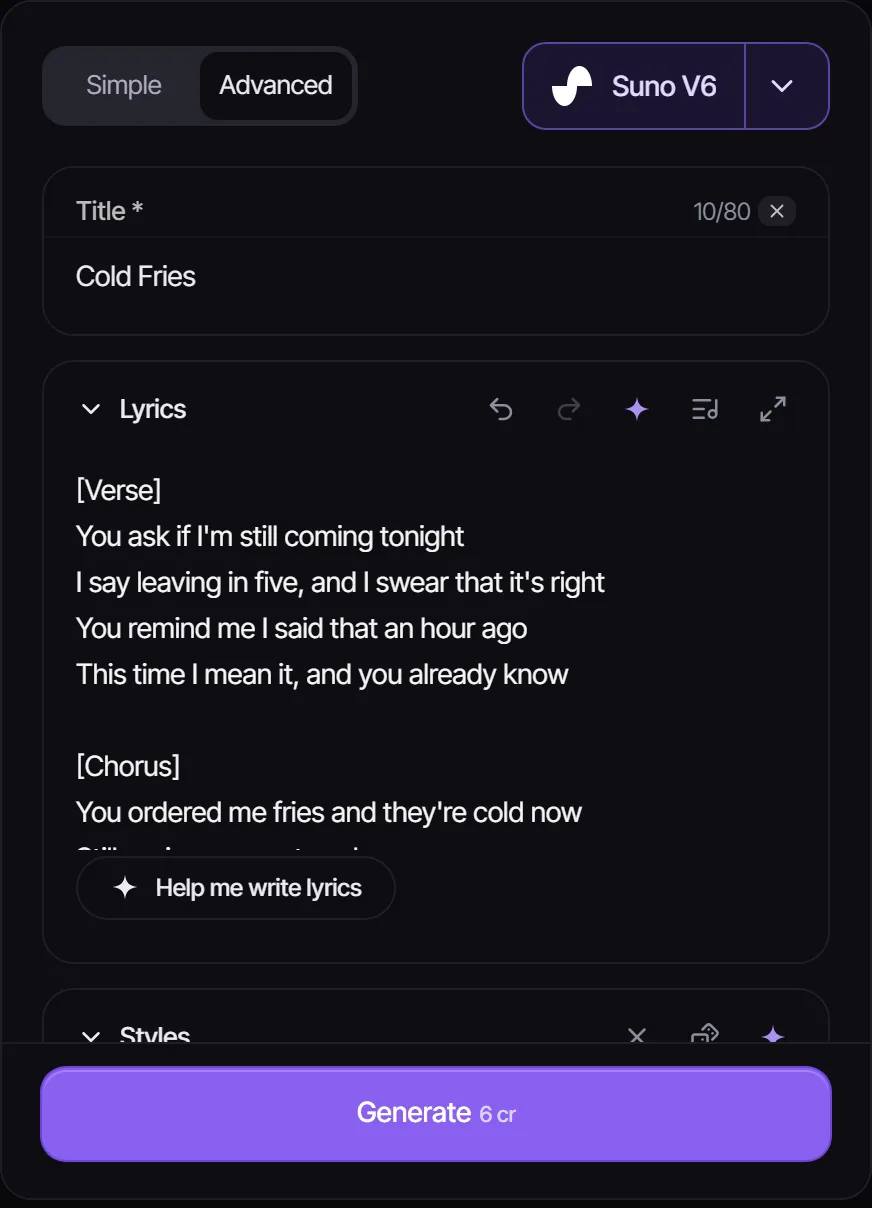
And the same chat as lyrics. The verse keeps the back-and-forth, and the chorus is built on the cold fries:
[Verse]
You ask if I'm still coming tonight
I say leaving in five, and I swear that it's right
You remind me I said that an hour ago
This time I mean it, and you already know

[Chorus]
You ordered me fries and they're cold now
Still saving my seat anyhow
Leaving in five, I'm leaving in five
Still the best friend ever, the best friend alive
Stuck on the rhymes? Describe what happened in a sentence or two in the free AI Lyrics Generator, quote the message you want as the chorus, and edit the draft it writes.
Step 4: Generate the song
Open Lyrics to Song and paste the lyrics, tags included. Use the hook as the title. Then describe the style in a few words: the genre, the mood, the voice and the tempo. The style changes the joke as much as the words do:
- Funny group chat: upbeat pop punk or bright country, fast and playful.
- Love messages: acoustic ballad or slow R&B, soft vocals.
- A breakup: sad piano ballad or moody indie.
- A tiny argument: dramatic musical theatre or power ballad, sung completely straight.
- A parent's one-word reply: gospel choir or a heartfelt country song.
Choose a model, such as Suno V6, and generate. Make two or three takes before you change anything, because each take sings the same words differently.
Step 5: Share it
Download the song you like best. To make the kind of video people share, play the song over a screen recording of the chat scrolling, or over the screenshots shown one by one, in any video editor. Crop or blur names and profile photos in the screenshots too.
Songs made on the Free plan are for personal use. Paid plans (Plus and Pro) include commercial-use rights for eligible music, which matters if you post the video on a monetized account or use it to promote something.
Other texts you can turn into a song
The same steps work for any writing that means something to you: a poem, a journal entry, a toast, a voice-note transcript or a love letter. If you only have an idea and no words yet, describe it in the AI song maker and it writes the lyrics for you.
Common mistakes
- Pasting the whole chat: a long conversation loses the hook. Keep the best 6 to 20 messages.
- No chorus: without a repeated line the song wanders. Repeat the best message.
- Very uneven lines: a long line between short ones makes the vocals rush. Trim or split it.
- Leaving private details in: remove names, numbers and places before you generate.
Frequently asked questions
Can AI turn text messages into a song?
Yes. Shape the messages into lyrics with section tags, paste them into a lyrics-to-song generator, and the AI writes a melody and an arrangement and sings your words.
What is a text message song?
A song whose lyrics come from a real text conversation, usually made as a gift, an inside joke or a short video. The original wording is kept, so the people in the chat recognize it.
Is there a free way to turn texts into a song?
You can start free. New Songluna AI accounts get 8 free credits, which covers one Suno V6 song, and the AI Lyrics Generator that drafts the words is free to try without an account.
Do I need to upload screenshots of the chat?
No. Copy the messages as text and paste only the lines you want in the song. Text gives you control over exactly what is shared.
Can I use someone else's messages in a song?
Only with their permission. Remove names and identifying details either way, especially if you plan to post the song.
How long should the lyrics be?
For a short video, a verse and a chorus of 8 to 16 lines is enough. For a full song, two verses, a repeated chorus and an optional bridge come to roughly 150 to 300 words.