
How to Make a Song Instrumental: 4 Ways (2026)
How to make a song instrumental: find the official version, remove vocals with AI, split the stems or try phase cancellation, plus cleanup and copyright tips.
Wanting the instrumental of a song usually means one of three things: karaoke, practice, or a backing track to sing or rap over. There are four ways to get one, from a perfect official version to a free trick that works on some songs. This guide explains how to make a song instrumental with each method, which one to pick, and what you can do with the result.
How to make a song instrumental: the short version
- Search for an official instrumental first. Many releases include one, and nothing beats the original.
- If there is none, use an AI vocal remover: upload the song and download the instrumental and the vocals as separate tracks.
- Need to keep or drop other parts too, such as the drums? Split the song into stems instead.
- Start from the best file you have (WAV or FLAC over a low-bitrate MP3), and check the result on headphones.
Method 1: Find the official instrumental
Albums, singles and deluxe editions often include an instrumental version, and producers sell or share instrumentals of their beats. Search a streaming service for the song title with "instrumental". An official instrumental has no leftover vocals at all, so it is always the cleanest choice when one exists. It is still the original recording, though, so the copyright rules below apply.
Method 2: Remove the vocals with AI
An AI vocal remover has learned what voices sound like and rebuilds the song as two tracks: the instrumental without vocals, and the vocals on their own. It works on almost any modern recording and is the fastest way to make an instrumental online.
In the Songluna AI Vocal Remover:
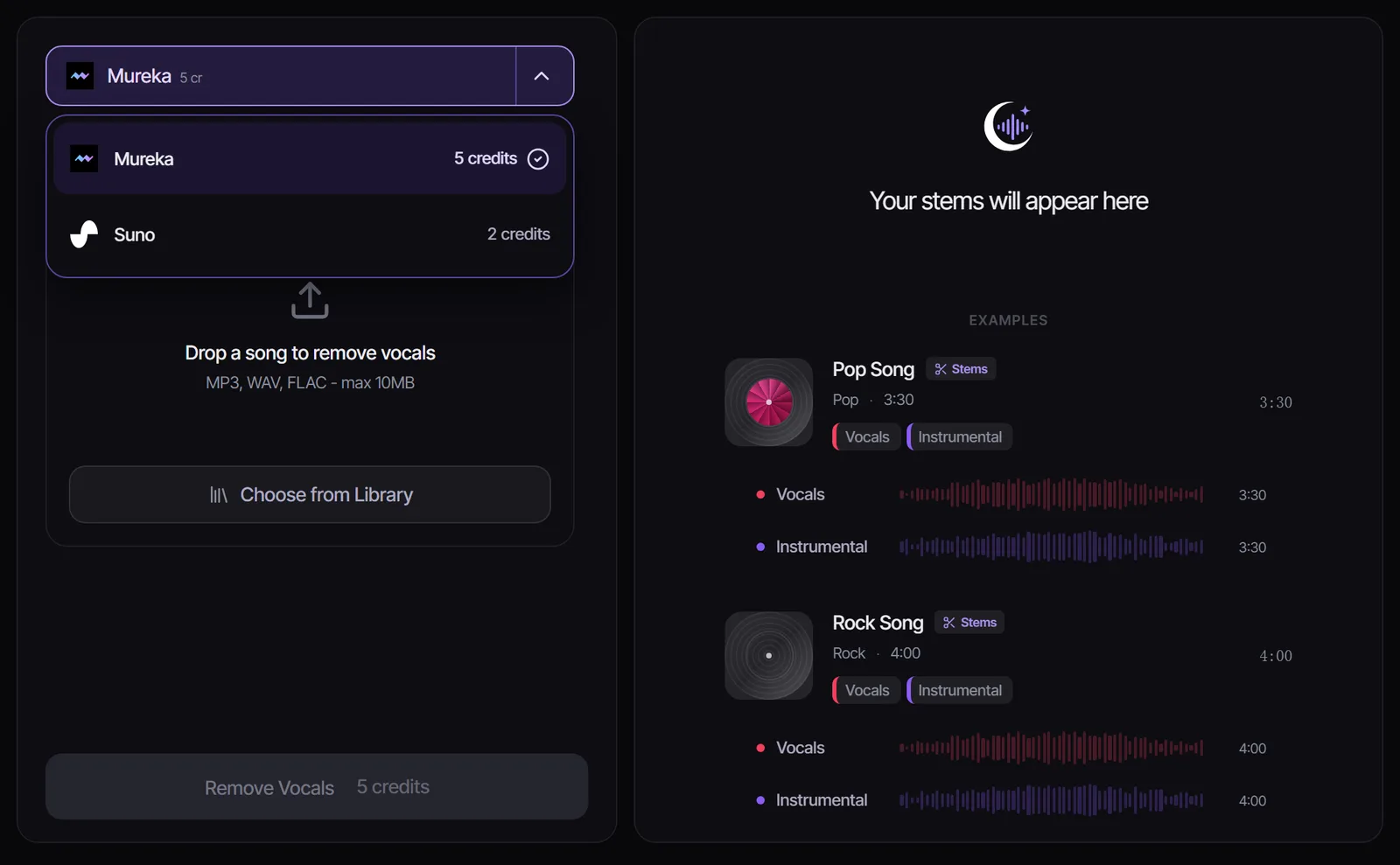
- Upload an MP3, WAV or FLAC file up to 10 MB, or pick a song from your Songluna AI library.
- Choose a model: Mureka works on any uploaded song for 5 credits; for songs you made with Suno in Songluna AI, Suno does it for 2 credits.
- Select Remove Vocals, listen to both tracks, and download the instrumental.
New accounts get 8 free credits, enough for one or two instrumentals.
Method 3: Split the song into stems
A stem splitter goes further than a vocal remover: it separates vocals, drums, bass and the other instruments. That helps when you want an instrumental without drums for a slower cover, a drumless practice track, or just the bass line to learn. The Stem Splitter gives four stems from any uploaded song; mute or delete the vocal stem and mix the rest back together in any audio editor.
Method 4: Phase cancellation (the free old trick)
Before AI, the trick was to flip the phase of one stereo channel and add it to the other, which cancels anything mixed exactly in the center. Vocals are often in the center, so they disappear, but so do the kick drum, the bass and anything else panned to the middle, and reverb on the voice stays behind. Free audio editors such as Audacity include a vocal reduction effect built on this idea. It costs nothing and is worth a try on older stereo recordings, but on most modern songs AI separation sounds far better.
Which method should you use?
Here is how to make an instrumental of a song for the most common goals:
- For karaoke or singing practice: an official instrumental if one exists, otherwise the AI vocal remover.
- For a drumless or bass-only practice track: the stem splitter.
- For music you want to publish: an original instrumental, below, because an instrumental of someone else's song is still their song.
- For a quick free test: phase cancellation in an audio editor.
How to get a cleaner instrumental
- Use the best source. A WAV, FLAC or high-bitrate MP3 separates more cleanly than a compressed video rip.
- Expect traces on heavy effects. Thick reverb, doubled vocals and choirs can leave faint ghosts; they are usually hidden once you sing over the track.
- Compare models. If one result has artifacts in a quiet part, try the other model on the same file.
- Turn it down a little. Lowering the instrumental slightly under your own voice hides most leftovers.
Make an original instrumental instead
If you need a backing track you can actually release, make a new one. In the AI song maker, describe the style, tempo and instruments and switch on Instrumental to get a track with no vocals. Songs made on a paid plan (Plus or Pro) include commercial-use rights for eligible music; songs made on the Free plan are for personal use. To add your own lyrics over a beat you already have, see Add Vocals to Instrumental.
Is it legal to make an instrumental of a song?
Removing the vocals does not remove the copyright. Making an instrumental for personal practice or singing at home is generally treated differently from publishing it, but uploading, selling or performing an instrumental of someone else's song in public usually needs permission from the rights holders. The AI music copyright guide covers how copyright works for music made with AI. This guide is general information, not legal advice.
Frequently asked questions
Can you make any song instrumental?
Almost any modern recording can be separated with AI, with the best results on clear studio mixes. Very old mono recordings and live recordings with a loud crowd are harder.
How do I make an instrumental online for free?
Phase cancellation in a free audio editor costs nothing but rarely sounds clean. An AI vocal remover sounds much better; new Songluna AI accounts get 8 free credits, enough for one or two songs.
What is the best way to make a song instrumental?
An official instrumental, when one exists. Otherwise an AI vocal remover, starting from the highest-quality file you have.
Can I make a song instrumental on my phone?
Yes. The Vocal Remover works in a mobile browser: upload the song from your phone and download the instrumental.
Can I post an instrumental I made on YouTube or TikTok?
Only if you have permission for the original song. Otherwise the upload can be muted, blocked or claimed. For music you can post freely, make an original instrumental.