
MusicXML to MIDI Converter
Drop in a MusicXML or MXL score and download a MIDI file with one track per part. It converts in your browser, so the file never leaves your device.
Free and unlimited, no account needed. Export MusicXML from MuseScore, Finale, Sibelius or Dorico, then drop it here.
Your MIDI file will appear here
Each part becomes its own MIDI track with its instrument, tempo and time signature. Chords, ties, rests and multiple voices carry over.
How to convert MusicXML to MIDI
- 1
Choose your score
Select a .musicxml, .xml or compressed .mxl file, exported from MuseScore, Finale, Sibelius, Dorico or another notation app. Or try the sample score.
- 2
Check the conversion
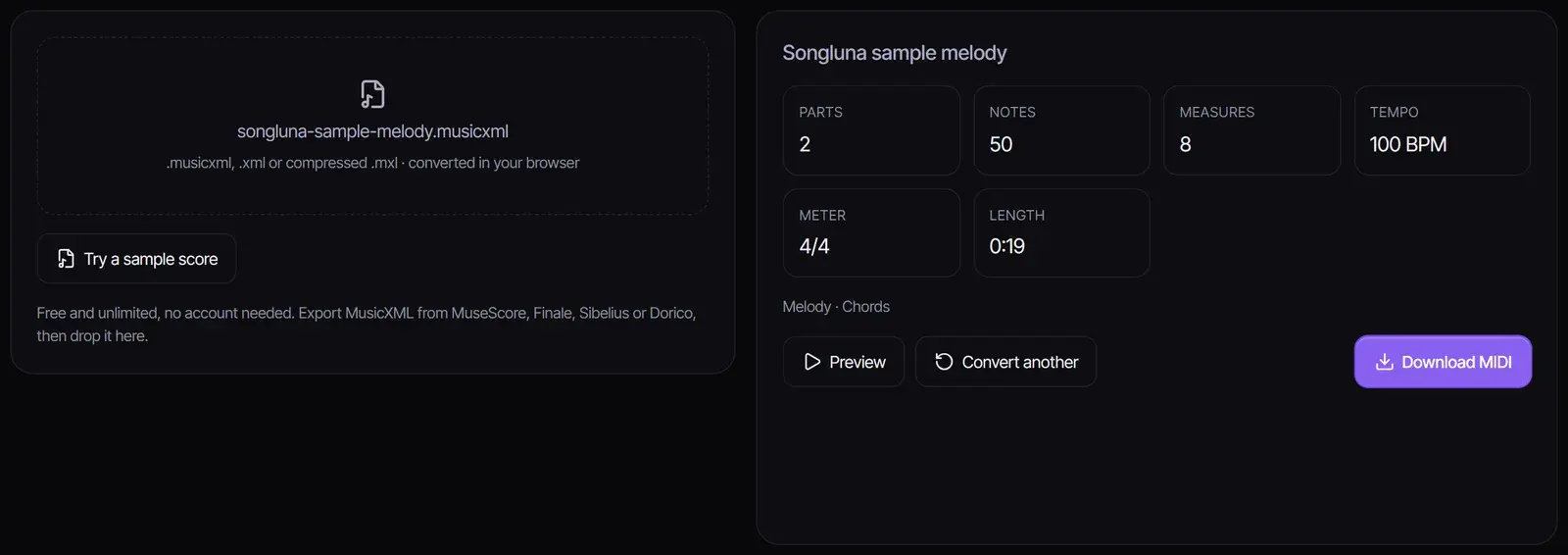
The converter lists the parts, notes, measures, tempo, meter and length, and notes anything it could not carry over. Select Preview to listen.
- 3
Download the MIDI file
Select Download MIDI. Each part is its own track with its instrument, ready for a DAW, a piano app or a MIDI player.
What carries over to MIDI
| In the score | In the MIDI file |
|---|---|
| Parts and their instruments | One track per part, with the instrument from the score where it is set |
| Notes, chords and rests | Exact pitches and rhythms |
| Ties | One held note |
| Several voices or staves in a part | All notes in the same track |
| Tempo and time signature | The first tempo marking and meter |
| Percussion with MIDI sounds | A drum track on channel 10 |
Limits to know
- Repeats and endings play once, as written; they are not expanded.
- Only the first tempo is used; later tempo changes are not applied.
- Grace notes are left out, and dynamics are only kept where the score sets a playback dynamic.
- Timewise MusicXML is not supported; export partwise MusicXML, which is the default in most apps.
MIDI stores notes and timing, not notation. Slurs, articulation marks, lyrics and page layout stay in the score.
MusicXML, MXL and MIDI
MusicXML is a text format for sheet music that almost every notation app reads and writes; .mxl is the same thing in a compressed file, and both work here. MIDI is a performance format: it tells a synthesizer which notes to play and when. Converting MusicXML to MIDI is how you hear a score, practice along with it, or move it into a DAW.
Going the other way? MIDI to Sheet Music turns a MIDI file back into notation, and MP3 to MIDI turns a recording into MIDI notes.
Frequently asked questions
How do I convert MusicXML to MIDI?
Choose your .musicxml, .xml or .mxl file here and select Download MIDI. You can also export MIDI from a notation app such as MuseScore with File, Export.
Is the converter free?
Yes. It runs in your browser with no account and no limit, and your score is not uploaded anywhere.
Can I convert MXL to MIDI?
Yes. Compressed .mxl files work the same way as uncompressed MusicXML.
Why does my MIDI file play repeats only once?
Repeats and first and second endings are kept as written rather than expanded. Write the repeat out in your notation app before exporting if you need it in the MIDI file.
Will the instruments be kept?
Yes, where the score sets a MIDI instrument for a part. Parts without one use a piano sound, which you can change in your DAW.
Can I convert several files at once?
Convert one score at a time. Each conversion takes a moment because it all happens in your browser.
Sources
- MusicXML 4.0W3C Music Notation Community Group
Updated October 24, 2026 · Written and reviewed by the Songluna AI team
Make new music from your ideas
Turn a melody or a description into a full song in the AI Music Generator. New accounts get 8 free credits.